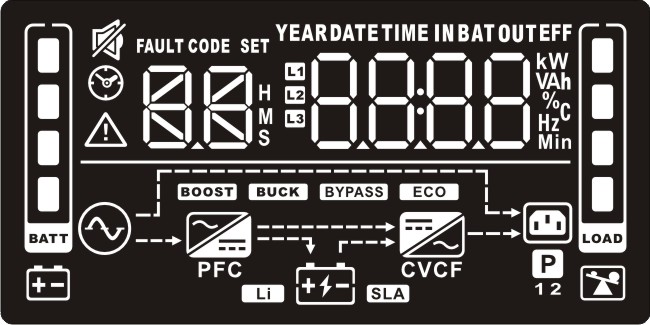
Reading the LCD panel
|
Display |
Function |
|
Backup time information |
|
|
|
Displays the estimated battery backup time. H: hours, M: minute, S: second. |
|
Configuration and fault information |
|
|
|
Displays the configurable UPS Settings. |
|
|
Displays the Fault reference codes codes. |
|
Mute operation |
|
|
|
Indicates that the UPS alarm is disabled. |
|
Input, Battery, Temperature, Output & Load information |
|
|
|
Displays the input voltage, input frequency, input current, battery voltage, battery current, battery capacity, ambient temperature, output voltage, output frequency, load current and load percentage. k: kilo, W: watt, V: voltage, A: ampere, %: percent, ℃: centigrade degree, Hz: frequency |
|
Load information |
|
|
|
Displays the load level by 0-24%, 25-49%, 50-74% and 75-100%. |
|
|
Indicates the UPS is overloaded. |
|
Programmable outlets information |
|
|
|
Indicates that the programmable outlets are working. |
|
Mode operation information |
|
|
|
Indicates the UPS is connected to the mains power. |
|
|
Indicates the battery is working. |
|
|
Indicates the the UPS is charging. |
|
|
Indicates the bypass circuit is working. |
|
|
Indicates ECO mode is enabled. |
|
|
Indicates the AC to DC circuit is working. |
|
|
Indicates the PFC circuit is working. |
|
|
Indicates the inverter circuit is working. |
|
|
Indicates the UPS is in Converter mode. |
|
|
Indicates the UPS output is working. |
|
Battery information |
|
|
|
Displays the battery level by 0-24%, 25-49%, 50-74%, and 75-100%. |
|
|
Indicates low battery. |








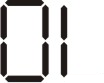
LCD display wordings index
|
Abbreviation |
Display content |
Meaning |
|
ENA |
|
Enable |
|
DIS |
|
Disable |
|
ESC |
|
Escape |
|
HLS |
|
High loss |
|
LLS |
|
Low loss |
|
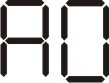
AO |
|
Active open |
|
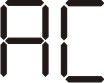
AC |
|
Active close |
|
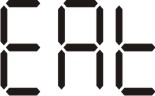
EAT |
|
Estimated autonomy time |
|
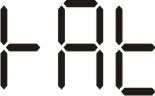
RAT |
|
Running autonomy time |
|
SD |
|
Shutdown |
|
OK |
|
OK |
|
ON |
|
ON |
|
BL |
|
Battery low |
|
OL |
|
Overload |
|
OI |
|
Over input current |
|
NC |
|
Battery No Connect |
|
OC |
|
Over charged |
|
SF |
|
Site wiring fault |
|
EP |
|
EPO |
|
TP |
|
Temperature |
|
CH |
|
Charger |
|
BF |
|
Battery fault |
|
BV |
|
Bypass out of range |
|
FU |
|
Bypass frequency unstable |
|
BR |
|
Battery replace |
|
EE |
|
EEPROM error |
|
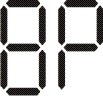
BP |
|
Battery packs |