Sound Settings
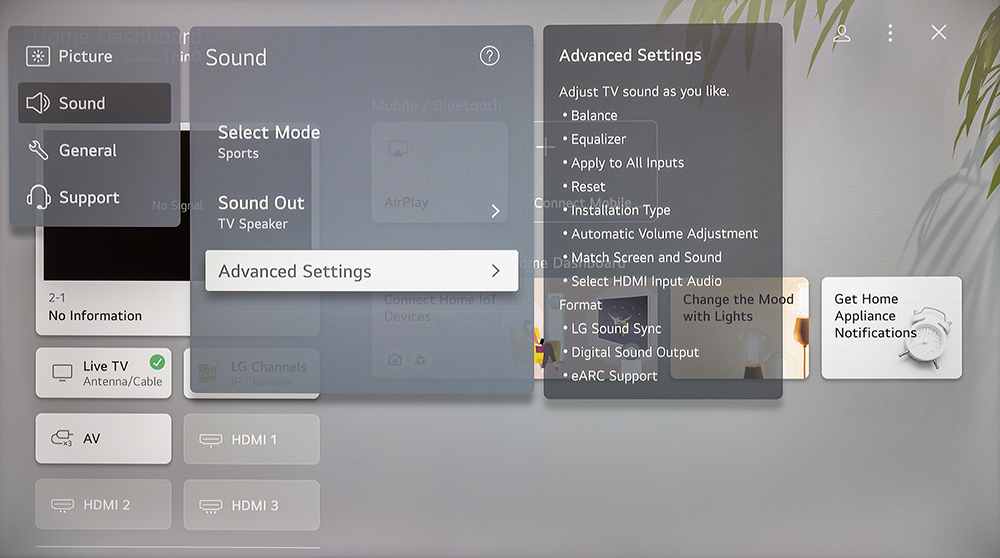
Sound settings include Mode, Sound Out, Balance, Equalizer, Installation Type, Automatic Volume Adjustment, Match Screen and Sound, LG Sound Sync, Digital Sound output, and eARC support.
All settings > Sound
Sound Out
Listening to the TV through Bluetooth devices
To listen to the TV through Bluetooth devices, navigate to:
All Settings > Sound > Sound Out > Use Wireless Speaker
Follow the onscreen instructions to connect to the device.
HDMI(ARC) Device
CEC & ARC are referred to as SIMPLINK on this TV. SIMPLINK (HDMI-CEC) must be enabled on the TV for ARC to work.
If you enable Sound Out > HDMI (ARC) Device, the TV automatically turns on CEC (Simplink).
Otherwise, to enable CEC, navigate to the following setting:
All Settings > General > Devices > HDMI Settings > SIMPLINK (HDMI-CEC)
Basic operation of CEC allows a CEC source HDMI device to turn your SunBrite TV on / off. This is generally off by default on your source device, consult the help manual for your source device to enable this feature.
SIMPLINK (HDMI-CEC) will also control the volume level of a compatible amplifier using the TV’s remote.
ARC allows audio to be returned to an amplifier using HDMI2.
eARC
To use eARC, navigate to All Settings > Sound > Advanced Settings > eARC Support and enable the setting.
Note: Older ARC-enabled amplifiers may not be compatible with eARC. If you’re experiencing audio problems with an older amplifier, disable eARC in your TV.
Advanced Settings
All Settings > Sound > Advanced Settings
Multiple sound presets are provided along with an equalizer for fine tuning sound output.
Apply to all Inputs: Apply the current Balance and Equalizer settings to all input.
Reset: Sets the sound settings to default.
Installation Type: Select Stand or Wall-Mounted per your preferences.
Automatic Volume Control: Enable to prevent the perceived volume from changing when you switch TV channels.
Match Screen and Sound: Adjust the digital audio output delay time to sync sound from an external speaker with the images on the TV. This is only applicable when Audio Output is set to ARC or when external audio players are connected via the Digital Audio Out jack.
Select HDMI Input Audio Format: Select Bitstream or PCM for any of the HDMI inputs.
LG Sound Sync: This makes connecting a sound bar to your TV easy and wire free using Bluetooth technology.
Digital Sound Output: (PCM, Auto, or Passthrough) Select the digital audio output format that best suits the audio device type. This is only applicable when Audio Output is set to ARC.
eARC Support: Enable/disable
Note: Be aware of the TV’s Sound Out setting as it is easy to accidentally change the Sound Out setting. If you end up with no audio, check the Sound Out setting first.